Looting System
0 - Introduction
The purpose of this document is to give a more detailed explanation on how Looting would work in the Mawforged MVP. Note that changes can be made to this system in the final game. Should the assigned programmer need any more information, contact @Alexandros Mloukie .
1 - Looting Process
1.1 - Enemy Inventory
For looting to be possible, the enemies need to have their own inventory components, similar to the ones the player has. This inventory also has to be populated with the enemy drops, which must be changeable later using a designer-friendly approach.
1.2 - Loot Display
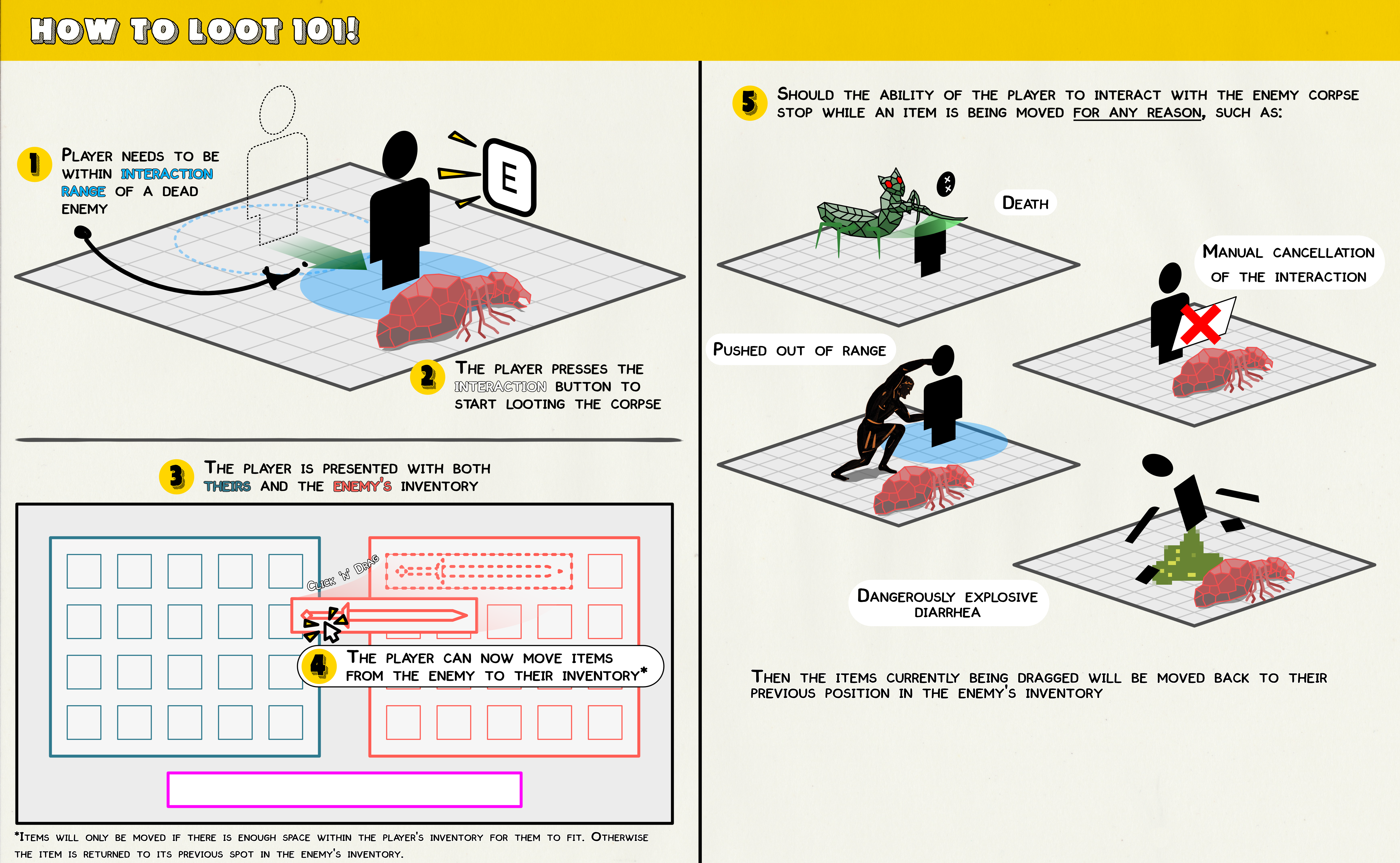
When interacting with the corpse of an enemy to loot them, both the player and enemy inventories must be displayed side by side:
1.3 - Item Movement
With the looting engaged, the player can now move items from the enemy's inventory to their own. Items are only moved if they can fit in the inventory.
- Should the player attempt to move an item but ends the interaction with the enemy corpse, the item is not moved and retains its original place on the enemy's inventory.
- Items cannot be moved from the player's inventory to that of the enemy's. One-way only.
- Items cannot be placed onto the toolbar directly from the enemy inventory.