
Fire Crystal Ant - AI
Version 4.1 by Adam Janus on 2026/01/19 20:49
Fire Crystal Ant
1. Introduction
- A low-level, early-game hostile creature.
- Introduce directional combat and basic telegraphed enemy attacks.
- Drops basic loot.

2. Enemy Behaviours
2.1 Patrol
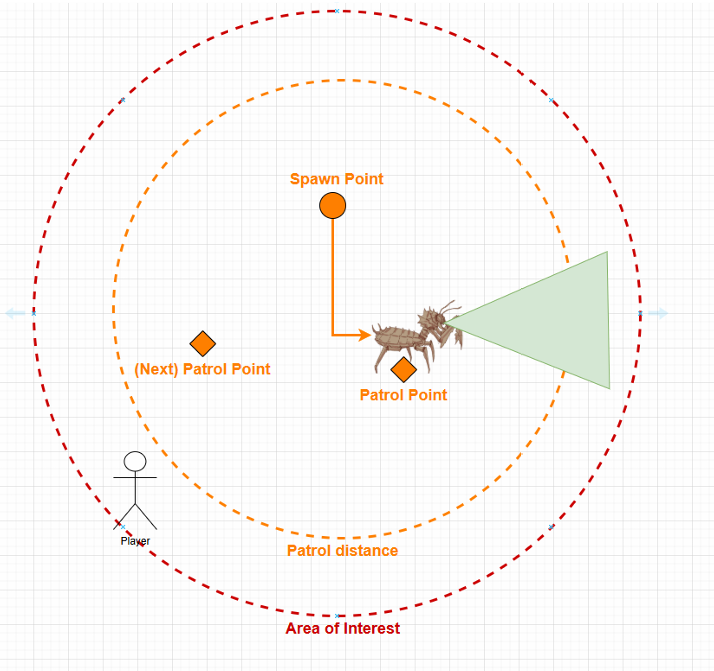
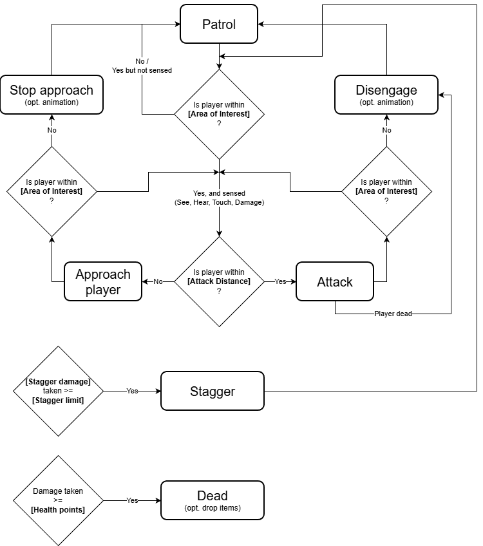
- Triggered by: Not engaged in any other behaviour OR end of Disengage behaviour
- Shown behaviour: Picks a location within its [Patrol Distance], rotates towards it and moves until it reaches it at [Patrol Speed].
- This is handled by a Custom Task and the MoveTo task of UE’s Behaviour Trees
- A new random location is picked after [NextPatrolWait]
- Transition rule: Senses the Player by sight, hearing, colision or damage.
- Senses are handled by Unreal Engine’s AIPerception component
- Attacking an unaware Enemy triggers this behaviour
- Animation:
- Normal ant-walking animation,
- On reaching patrol destination,
2.2 Approach

- Triggered by: end of Patrol Behaviour
- Shown behaviour: the Enemy rotates towards the Player and moves towards their direction at [Approach Speed].
- This is handled by the MoveTo task
- Transition rule: the Enemy stops moving when they are closer than [Attack Distance] from the Player and they still have the Player in their Line of Sight
- [Attack Distance] overrides the [Acceptable Radius] value in the MoveTo Task and is edited on a per-enemy basis based on their Design
- Animation:
- Faster ant-walking animation
2.3 Enemy Attack

- Triggered by: end of Approach Behaviour
- Shown behaviour: the Enemy triggers an Attack Animation Montage or Move Animation Montage
- Pincer attack is preferred usually.
Charge attack is preferred when:
- Player is is outside of [Attack Distance] for more then 4 second.
- Abdomen Attack is preferred when:
- Player has reached the [Hit Streak Limit].
- Lower preference than Stinger Attack.
- Player has reached the [Hit Streak Limit].
- Transition rule: the Enemy evaluates if the Player is still within [Attack Distance] and in its Line of Sight and either Attacks again or starts the Approach Behaviour again
- Animation:
Described in 3.2 Enemy Attack.
2.4 Enemy Staggered
- Triggered by: [Stagger Damage] >= [Stagger Limit]
- Shown behaviour: the Enemy aborts all other Behaviours and triggers a Stagger Animation Montage and can't enter any other state while staggered.
- Transition rule: upon ending the Stagger Animation Montage and waiting [Stagger Time] the Enemy evaluates if the Player is still within [Attack Distance] and in its Line of Sight and either starts the Attacks Behaviour or the Approach Behaviour
2.5 Enemy Disengage

- Triggered by: the Player gets further than the Enemy’s [AreaOfInterest]
- Shown behaviour: the Enemy rotates towards its [SpawnLocation] and goes back there
- This is handled by the MoveTo task
- Transition rule: upon reaching the [SpawnLocation] and waiting [NextPatrolWait] the Enemy starts the Patrol Behaviour
3. Action and Reactions
3.1 Attacking the Enemy
Upon registering damage, the following happens:
- Particles are spawned at the first point of impact
- If the flesh is hit, slightly bright gold particles. 1 burst: Short-lived and sparse.
- If the armour is hit, dull grey particles. Smaller particles. 1 burst: Short-lived and even sparser.
- A 2D Sound Effect is spawned
- If the flesh is hit, a satisfying crunch sound.
- If the armour is hit, a dull clang sound.
- Additionally, if flesh is hit, the crystals on the ant’s body glimmer in dull red (emissive).
- The Enemy receives damage based on the calculations in the CombatSystem_Design Document.
- The Enemy receives Stagger Damage.
3.2 Enemy Attack
3.2.1 Pincer attack
The ant uses the pincers on its face to “bite” the player.
3.2.1.1 Animation
Wind-up:
- Extend the pincers over 0.5 seconds.
- Also, tilt the head back by 15 degrees from normal position (or the closest that’s noticeable to the player))
- Hold for 0.5 seconds.
Swing:
- Snap shut over 0.2 seconds.
- Snap the head forward by 15 degrees from normal position.
- Slam sound
- [Notify] Apply slashing damage according to the number of pincer colliders that overlap the player.
Recovery:
- Pincers reach normal positions over 0.2 seconds.
- Cooldown for 2 seconds.
3.2.2 Charge attack
The ant leaps at player character and deals damage on land.
3.2.2.1 Animation
Wind-up:
- Rises the wings over 0.5 seconds.
- Start flapping the wings.
- Leaps forward while flapping the leaps (becomes airborne)
- Spreads limbs while airborne
- Curls head close to torso
Swing:
(ant is airborne always for 1.75 seconds)
- Ant flies at direction of player for 1 second.
- After 1 second, ants locks is landing spot at current player position.
- Brings it limbs close together
- rises its heads backward
- [Notifes] sounds
- Loud high pitch scream
- In 0.75 seconds, ants lands at previously locked landing spot, and deals damage with sphere collider.
Recovery:
- Body uncurls completely and the ant lands back on the ground over 0.5 seconds.
- Also, wings retract completely.
- becomes idle for 1.2 seconds.
3.2.3 Abdomen Slam
The ant spins its boddy and slams player character with its abdomen.
3.2.3.1 Animation
Wind-up:
- Ant curls into a C-Shape seen form top-down perspective for 1 second.
- Ant shakes it abdomen for 0.45 second.
- [Notify] rattle snake sound is played
- Ant rotation becomes locked.
Swing:
- Ant jumps while curled starts to spin along Z axis for 360 degrees.
- Collision becomes overlaid on ant's abdomen.
- While jumping, ants gradually uncurls it body until its fully uncurled by full 360 degrees.
Recovery:
- Ant land with previously locked rotation with body lowered close to ground.
- At slowly rises for 2 seconds.
- While rising ants cant perform any other action.
3.2 Enemy Stagger
- When the received [Stagger Damage] >= [Stagger Limit] the Enemy starts the Stagger Behaviour
- After completing the Staggered Behaviour the [Stagger Damage] gets reset to 0
- The received [Stagger Damage] goes down over time if new [Stagger Damage] is dealt every [Stagger Recovery Time]
3.4 Defeating the Enemy
- Upon reaching 0 HP the Enemy becomes ragdoll and stops using its Behaviour Tree.
- Looting is enabled
4. Instance Editables
| ||
abdomen | abdomen attack | |